Cavalry Better UI
The UI tweaks I wished Cavalry had. Scale the whole interface and recolor it with themes. Put Cavalry or the viewport to fullscreen.
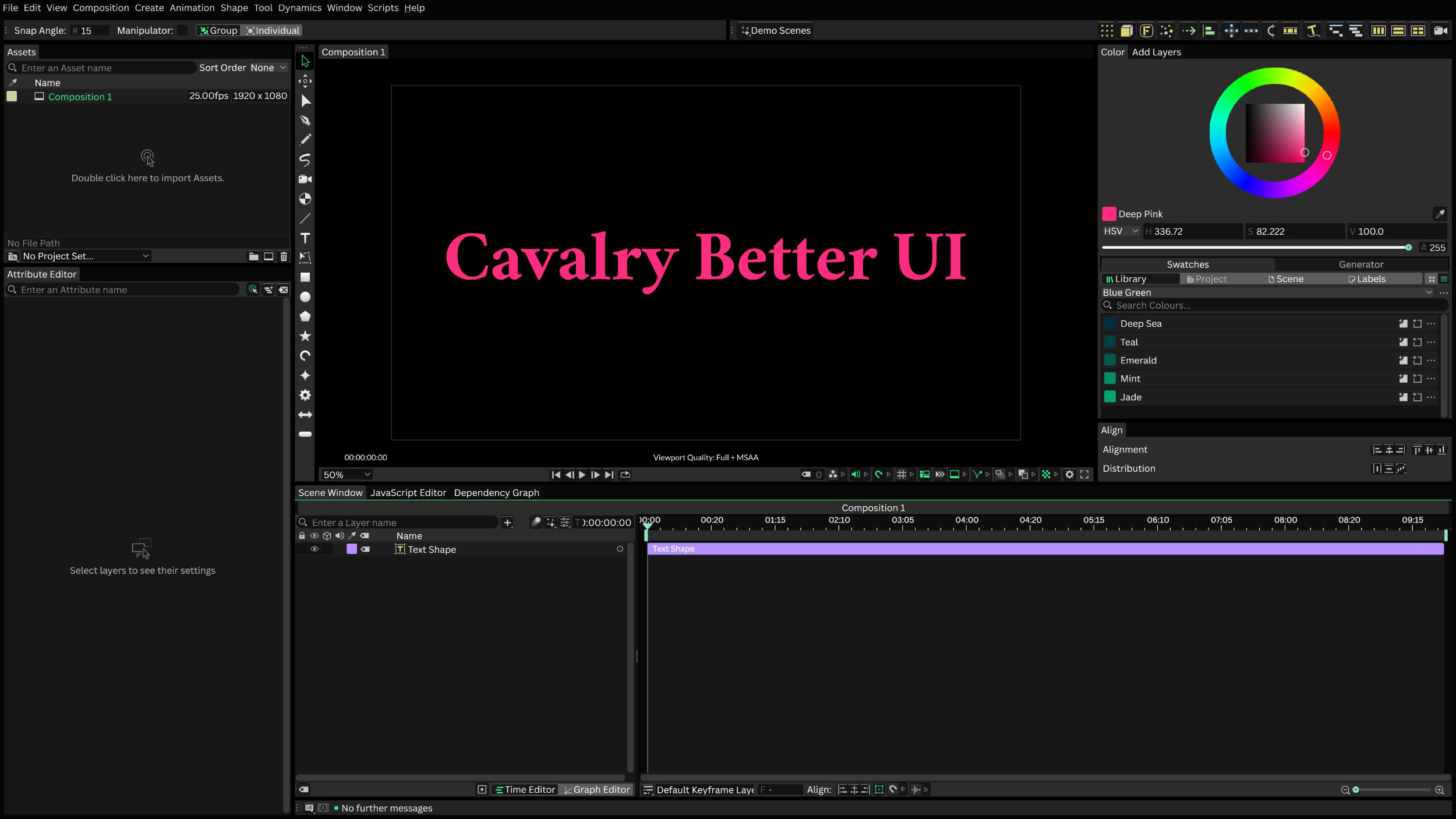
Part of the reason I turned my back on Adobe products is that their UI scaling is terrible. On my 4K monitor, After Effects was so tiny I had to squint to read the text. Cavalry at least has a font size setting, but the rest of the interface is still a bit small. So I sat down and wrote an extension for it, allowing you to scale the whole interface to your liking. Additionally, you can put the whole app or just the viewport into fullscreen. And last but not least, you can theme the interface (my new default theme is now darker, improving the contrast of text elements). "Cavalry Better UI" bundles all of these improvements into a single small program.
This project is not affiliated with or endorsed by Cavalry.
One-time purchase, includes all future updates for life.
A download link is sent to you by email after checkout.
Please confirm both points to continue to the checkout.
Prices are in euro. If you choose another currency on the checkout page, the amount is converted by Dodo Payments and a currency-conversion fee may be added on top.
Key Features
- Scale the entire UI. Choose 90 % to 150 % in steps of 5 %, in the Preferences or with Ctrl+Plus and Ctrl+Minus. Text, icons and spacing grow together and the change applies instantly (no restart required).
- UI themes. The new default theme is darker and has a higher contrast. You can pick between "Default", "Darker" and "Nebula" in the Preferences, or define your own. Switching themes needs a restart.

- Fullscreen app. I mean, come on Cavalry, why can't we put the app into fullscreen? Now you can by simply pressing F11.
-
Fullscreen viewports. Floating viewports (
Window > Add Viewport) are now independent windows. Press F11 or click the button in the viewport's footer, and the viewport goes to fullscreen (with the composition zoomed to fit your monitor). This is especially helpful when you work with multiple monitors (or for projection mapping 😅).
How It Works
Cavalry is built with the Qt framework, and so is this extension. When you start Cavalry Better UI, it finds your Cavalry installation and starts it as usual. While Cavalry starts, the extension is loaded alongside it and works with the same Qt windows and widgets that make up Cavalry's interface. That is how it scales the whole interface, recolors it with themes, and puts the viewport into fullscreen. No file of your Cavalry installation is changed, and if you start Cavalry the usual way, you get the original Cavalry.
Known Limitations
Windows only. The extension relies on Windows internals and the Windows build of Cavalry. MacOS is not supported, and there are no plans for it at the moment, I'm sorry.
Tied to Cavalry's Qt version. This extension is built for the Qt version that ships with the current Cavalry release. A Cavalry update can update it or parts of its internal structure, which could break the extension. If that happens, please let me know and I'll fix it.
Acknowledgements
This project wouldn't exist without the Cavalry team, who built a really nice animation software. Also thanks to the Qt project for the framework that makes this possible.
Installation
Download Cavalry Better UI.exe and put it wherever you like, for instance on your Desktop. Double-click it to start Cavalry with the extension. If Cavalry is not installed in C:\Program Files\Cavalry, you are asked once where Cavalry.exe is.
The exe is not signed. This is a small project and those certificates are too expensive and too much of a hassle to set up (there is a lot of politics and bureaucracy involved). Therefore, Windows will warn you when you start the app for the first time (“Windows protected your PC” by SmartScreen, or an unknown publisher). To continue, click More info and then Run anyway. If you'd rather not run an unsigned program, don't buy this product.
Usage
- F11 to put the whole Cavalry window fullscreen, and back.
- F11 in a viewport window to put it to fullscreen (or click on the icon in the footer bar). Press F11 again or click the button in the top right corner to go back.
- Ctrl+Plus and Ctrl+Minus to scale the UI up or down in increments of 5%.
-
In
Preferences > UI, you can choose a UI scaling from 90 % to 150 % (default 110 %), and a theme: Default, Darker or Nebula. The theme change requires a restart. The folder button next to the setting shows the filethemes.ini. Open it in a text editor to add your own themes. -
All settings are stored in
%APPDATA%\Cavalry Better UIand survive moving or replacing the exe. To remove the product, delete the exe and that folder, plus%LOCALAPPDATA%\Cavalry Better UI.
Releases
1.1.0 — 2026-10-10
Tested on Cavalry 2.8.
- When increasing the UI size, the viewport could overlap the panels next to it. Now, the viewport stays in its size and footer icons move into a new
>>menu at the end of the footer if they don't fit the width. - Undocking the viewport now remembers the size it had while docked. It also comes to the front now. Its window can be made as narrow as you like, the footer icons that don't fit go into the
>>menu. - Fixed a broken timeline's playhead when changing the UI scale.
- Fixed a viewport showing two fullscreen buttons after it was dragged to another place in the main window.
- Fixed
themes.inisometimes not being created.
1.0.0 — 2026-10-08
Initial release for Cavalry version 2.8. Older versions are not supported.
- Fullscreen for viewport windows.
- F11 fullscreen for the main window, remembered between runs.
- UI scaling from 90 % to 150 % in 5 % steps, also via Ctrl+Plus and Ctrl+Minus.
- UI themes (Darker, Nebula and your own).
Comments are hosted by giscus and GitHub. Loading them sends your IP address and browser data there, and GitHub may set cookies.
Applies to this page only · Privacy