TypstRider
Bring the power of Typst to Cavalry.
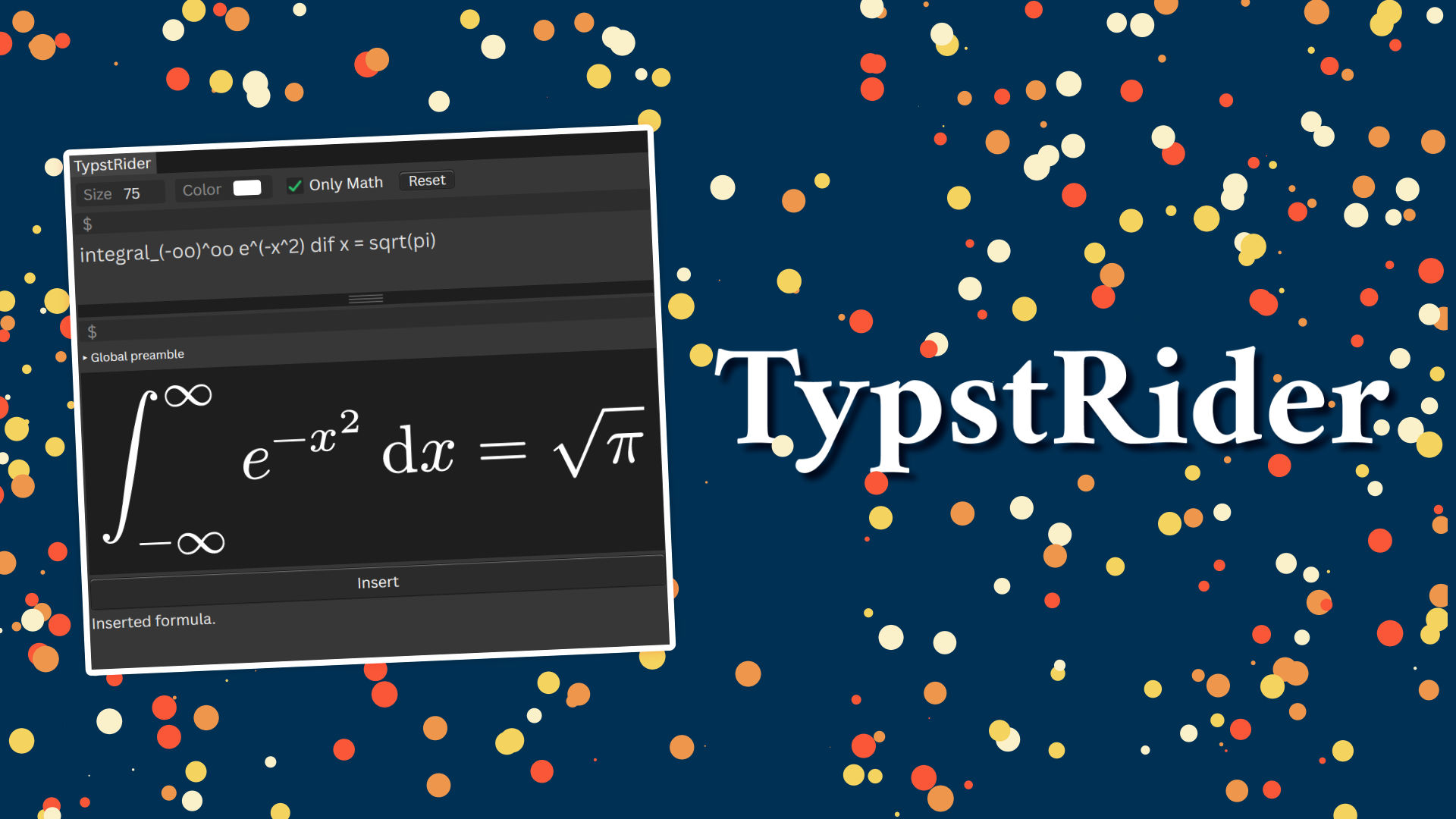
With TypstRider, you get a new UI in Cavalry that lets you preview Typst formulas (and LaTeX formulas) in real-time, then insert them into your composition as shape objects. You can click again on formulas to update their content afterwards. Packages from the Typst Universe are also supported.
This project is not affiliated with or endorsed by Typst or Cavalry.
One-time purchase, includes all future updates for life.
A download link is sent to you by email after checkout.
Please confirm both points to continue to the checkout.
Prices are in euro. If you choose another currency on the checkout page, the amount is converted by Dodo Payments and a currency-conversion fee may be added on top.
Main Features
-
Live preview. Typst is blazing fast. To honor this, you get a preview pane where you see the resulting Typst formula as you type.
-
Vector shapes. The compiled Typst formula is inserted as native Cavalry vector layers (grouped together). Every glyph is an editable path you can style, animate and deform like any other shape. Insertion usually takes less than a second.
-
Edit formulas in place. Select a formula you inserted earlier to load it back into TypstRider. This way, you can update existing formulas.
-
Typst Universe packages.
#import "@preview/…"works, i.e. you can use packages from the Typst Universe, yeah ;) A package is downloaded once from the official registry, cached on disk, and read locally from then on. Cavalry asks for network permission only the first time.
Convenience Features
-
“Only Math” mode. If activated, TypstRider assumes your formula is math and automatically wraps it in
$ … $. -
Color picker. Pick the fill color for a formula. New formulas start white on a dark composition and black on a light one, so text is readable by default.
-
Resolution-aware font size. Specify the font size in points (pt). The default is adjusted to your current composition’s resolution, so formulas are legible whether your scene is HD or 4K. Selecting several formulas at once lets you re-render them all at once with a new font size.
-
Preamble editor. In the preamble, you can write Typst code that is compiled before your formula, e.g. for importing packages you frequently use. The preamble is also saved alongside each formula, so each formula is reproducible even if you change the global preamble later.
-
Runs locally. The Typst compiler runs inside Cavalry via WebAssembly and ships with Typst’s standard fonts, so formulas render exactly as the
typstcommand-line tool would. No Internet connection is needed (except for downloading packages from the Typst Universe the first time you use them).
Known Limitations
- Fixed fonts. Only the fonts Typst bundles by default are available; you can’t add your own.
- SVG limitations. The Cavalry SVG importer is not perfect. TypstRider already works around many of its quirks with SVG flattening, but some SVG features may not import correctly. Especially gradients and transparency may not render as expected.
- Big figures. For large figures with more than 150 flattened paths, TypstRider merges paths that share the same style. This is to avoid an unresponsive Cavalry interface. This is a trade-off: it is a lot faster, however now some shape objects include different parts of the figure, which may make it harder to select and animate them individually.
Acknowledgements
This project wouldn’t exist without the amazing work of the Typst team as well as Myriad Dreamin, who brought Typst to JavaScript in their typst.ts project. Thanks also to Remco from Scenery for their support and for their dev tools as well as the Cavalry team for their really cool animation software.
Installation
- Download the
TypstRider.zip(a download link is sent to you by email after checkout). - In Cavalry navigate to
Scripts > Show Scripts Folder. - Drag the
TypstRider.zipinto the Scripts folder and unzip its contents in-place.
TheTypstRider.jscfile should be in the root of the Scripts folder, and thetypstrider_assetsfolder should be alongside it. If you want to, you can delete theTypstRider.zipnow. - In Cavalry navigate to
Scripts > TypstRider.
Upon first use, you may be asked to allow network access. This is needed for downloading packages from the Typst Universe the first time you use them. After that, everything runs locally. You might also want to click on the “Reset” button of TypstRider to ensure that the settings are in a clean state.
Examples
If you’re new to Typst, their Getting Started guide is a good place to start (and in general the Typst docs are awesome). They also have a Guide for LaTeX Users. And if you really want to write math in LaTeX with TypstRider, check out the mitex package from the Typst Universe.
What about some sample formulas to try things out? Activate the Only Math mode such
that you don’t have to write $ around your formulas.
integral_0^oo e^(-x^2) dif x = sqrt(pi) / 2To test the preamble feature, you can use the following example:
# Put this in the preamble:
#let vec3(a, b, c) = $vec(#a, #b, #c)$
#let R = math.bb("R")

# Put this in the main document:
vec3(x, y, z) in R^3
or what about some Typst Universe packages:
#import "@preview/physica:0.9.8": *
curl vb(E) = - pdv(vb(B), t)#import "@preview/fletcher:0.5.8" as fletcher: diagram, node, edge
#diagram(cell-size: 15mm, $
G edge(f, ->) edge("d", pi, ->>) & im(f) G slash ker(f) edge("ur", tilde(f), "hook-->")
$)#import "@preview/conchord:0.4.0": smart-chord
#box(smart-chord("Am"))
Comments are hosted by giscus and GitHub. Loading them sends your IP address and browser data there, and GitHub may set cookies.
Applies to this page only · Privacy