Claude Desktop Cavalry MCP
Get a helping hand by Claude Desktop for your Cavalry project.
An MCP server for Claude Desktop. It automatically installs a small bridge in Cavalry, such that the agent can read the current scene state and execute code in your project. The MCP server also bundles the entire Cavalry user docs, node reference and JavaScript API, and searches across all of it at once, so Claude gives you precise, up-to-date answers instead of guessing.
This project is not affiliated with or endorsed by Cavalry, nor by Anthropic. All prompts were tested with Sonnet 5 (medium effort), unless otherwise stated.
One-time purchase, includes all future updates for life.
A download link is sent to you by email after checkout.
Please confirm both points to continue to the checkout.
Prices are in euro. If you choose another currency on the checkout page, the amount is converted by Dodo Payments and a currency-conversion fee may be added on top.
Move forward
You're the artist with taste and ideas. It's frustrating when you can't get them out of your head the way you want, e.g. because you're new to Cavalry or just human and don't know every functionality of a complex program. With the CavalryMCP, you can ask Claude to help you with your project, while remaining in full control.
Prompt
Use the CavalryMCP. I made a path and a blue rectangle. Now I want that the rectangle follows along the path while changing its rotation according to the normal vector of the curve. Do this procedurally such that I can later change the path itself.
Prompt
Use the CavalryMCP. I have a bouncing ball animation using Forge Dynamics. But right now, the ball only bounces off the ground (composition bottom). Instead, I want it to bounce off the rectangle named "Ground". Fix that and also tell me how I could have achieved that in the UI on my own.
How to do it in the UI
- Select the Forge Dynamics layer, open its Attributes.
- Under Ground Mode, switch it to Off (Attributes panel, top-level settings).
- Drag the Ground layer from the Scene/Assets into the Forge Dynamics Bodies (shapes) attribute — or right-click Ground → Add Body → Add to Forge Dynamics.
- On the new Body entry for Ground, open its Body tab and change Body Type from Dynamic to Still (a Still body participates in collisions but doesn't move or fall).
- Scrub the timeline (or hit play)to re-simulate — the Ball should now bounce off the Ground rectangle's top edge instead of the composition's bottom edge.
Better Understand Cavalry
LLMs are also great for learning. You can ask Claude to explain how a certain feature works or how to achieve a certain effect. The MCP server gives Claude access to the current scene state and its own search engine over the bundled Cavalry docs: the full user documentation, the node/layer reference, and the JavaScript API.
Prompt
Use the CavalryMCP. Is there a way in Cavalry to automatically animate text paragraph by paragraph? E.g. some snappy, staggered reveal animation?
Yes — Cavalry has a built-in behavior made exactly for this: Auto-Animate, combined with Text's paragraph/line level splitting. Here's the recipe for a snappy, staggered paragraph-by-paragraph reveal:
Steps
- Create your Text Shape with each paragraph separated by a blank line (Cavalry treats a paragraph as text separated by an empty line).
- Select the Text Shape, and click Auto-Animate in the Shelf (this auto-checks Use Levels, since Text is a sub-mesh).
-
In Auto-Animate's Animation tab, set:
- Level Mode → Custom... with a Custom Level Range targeting Paragraph.
- Opacity Mode → Fade Up for a reveal.
- In the Timing tab, check Time Offset so each paragraph is staggered automatically.
Prompt
Use the CavalryMCP. Unfortunately, I've lost the overview over my scene. Tell me what is going on in all these layers.
Here's the picture of your scene, reconstructed from the scene graph:
Concept: A particle-morphing animation that spells out a sequence of math symbols/words, one morphing into the next — like sqrt → pi → e → integral → nabla → partial → delta → approx → infty → in → equiv → smaller → bigger → sum.
Core building blocks
basicShape#1"Particle" — the single source shape (a dot/particle) used by every duplicator below. Its fill color comes fromcolorArray#3"Colors".- 14 Duplicators, one per symbol. Each one distributes copies of
basicShape#1, is masked by its owneditableShape(a vector shape of that symbol's glyph), and has its particle scale driven by an oscillator, giving a lively size-jitter per particle.
The morph chain
Each duplicator's output feeds into a blendSubMeshPositions node that blends it toward the next duplicator in the sequence, which in turn becomes a deformer on the next duplicator. This creates one continuous pipeline from sqrt all the way to sum.
Summary: It's a 14-stage particle text-morph rig, each stage a masked duplicator plus a blend transition to the next, all sharing one particle shape and one color source, with staggers/oscillators layered on top for organic timing and scale variation.
Want me to check current attribute values, or render a preview frame to see it visually?
Dream Bigger
Why not aim even higher and let Claude implement a complex scene from scratch? Well, as expected, this pushes the limits and the results are doubtable. But still fun to see what is already possible and maybe useful to get started with a new project or to get inspiration for a new idea by quickly prototyping it.
Prompt
Use the CavalryMCP. I want to make an artistic animated simulation of a black hole showcasing its accretion disk in shades of an orange/red/amber (and maybe yellow/white for very hot regions).
This does not need to be a physically accurate simulation. Prioritize a visually striking, atmospheric result over strict scientific correctness.
The accretion disk should be animated and feel continuously in motion. Create visible rotational flow around the black hole, with some variation in speed, density, turbulence and brightness, such that the movement feels organic. You may want to use particles, procedural noise, trails, blur, distortion, or similar techniques available in Cavalry.
You may look up reference images of black holes and accretion disks, and briefly consult the underlying physics for visual inspiration, but treat those references as a starting point rather than a constraint.
Claude can read your images. So why not start your new project with a sketch on paper? Then let the agent give you some first working version of your idea in Cavalry.
Prompt
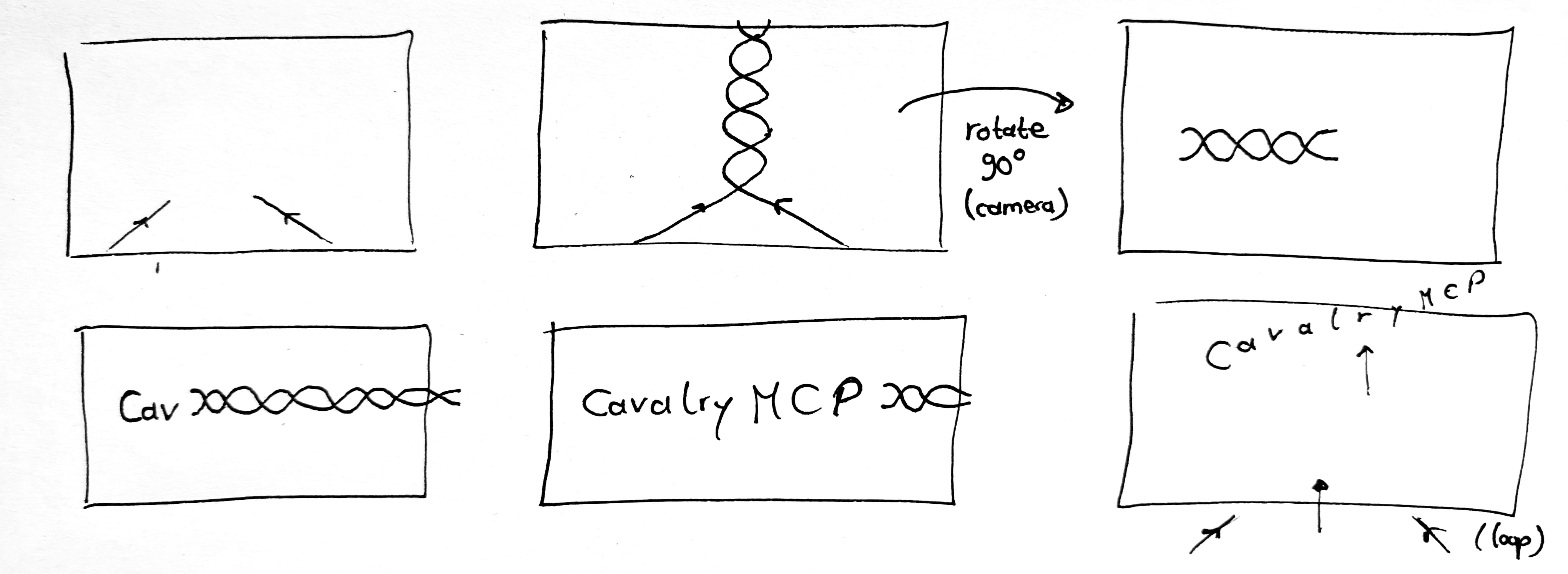
Use the CavalryMCP. Attached is a sketch of an animation storyboard I want to create in Cavalry. The strokes I drew should have some thickness to them and round caps. Arrows indicate in which direction they "flow". The animation should feel rather quick and organic. Whenever the two paths touch, a particle burst should be emitted from their position that spreads outwards in circles but quickly decays. Use two different bright and vibrant colors. The background should have a subtle gradient (with both colors contrasting those of the braid). Let the braid weave upwards, then rotate a camera later on. Afterwards (see second row), the braid reveals the text "CavalryMCP" from left to right. Finally, construct the animation such that it can loop, i.e. while the "CavalryMCP text" flies out to the top (staggered per character), the new paths of the new braid form from below. The whole animation should be around 8 to 10s long, with enough time to read the final text on screen.
Key Features
- Scene awareness. Claude can read the current state of your Cavalry scene: layers, attributes and the scene graph. This way, the agent can answer and edit based on your specific project. Less hallucinations, more relevant information.
- Code execution. Claude can write and run Cavalry JavaScript directly in your Cavalry project to modify existing layers, build new ones and wire them together.
- Bundled documentation, with a search engine built for it. The full Cavalry user docs, node/layer reference and the JavaScript API ship with the extension. A single query can search across all of it at once, and the results are ranked by relevance to your question. This way, Claude spends less tokens and less time guessing, and can give you more precise answers.
How It Works
The product installs two pieces: an MCP server that plugs into Claude Desktop, and a small bridge script that runs inside Cavalry. The bridge opens a local connection between the two, over which the MCP server can query the current scene state and submit JavaScript for Cavalry to execute (which is the same scripting API you can use in the Script Editor).
The full Cavalry user docs, node/layer reference and JavaScript API are bundled with the MCP server and pre-processed at build time into a single searchable index. This lets the MCP server's search tools jump straight to the passage that answers a question, instead of Claude having to load whole manuals into its context window or guess method names. The same index also helps during scene inspection, such that Claude can for example explain what a specific attribute on a layer actually does.
Known Limitations
No guaranteed results. Claude is an LLM (Large Language Model) with probabilistic outputs that depend a lot on your prompts and context. I can't guarantee that even with CavalryMCP you'll get the results you want, especially when asking for very complex scenes. Rather than "construct me this scene from scratch", I see its strengths in a search assistant for the docs and a fast collaborator for small and targeted edits in your project.
Single Composition awareness. Claude can only read the scene state of your currently active Composition, not other Compositions in your project.
Long-running actions may time out. Claude waits up to 2 minutes for Cavalry to finish executing a command. Very heavy operations (e.g. rendering many frames) may exceed this and appear to fail even though Cavalry is still working.
Acknowledgements
This project wouldn't exist without the Cavalry team building such a great animation tool, and Anthropic's work on Claude and the Model Context Protocol. Special thanks also for the devs behind Scenery for their development tools and their and their TypeScript definitions for Cavalry.
Installation
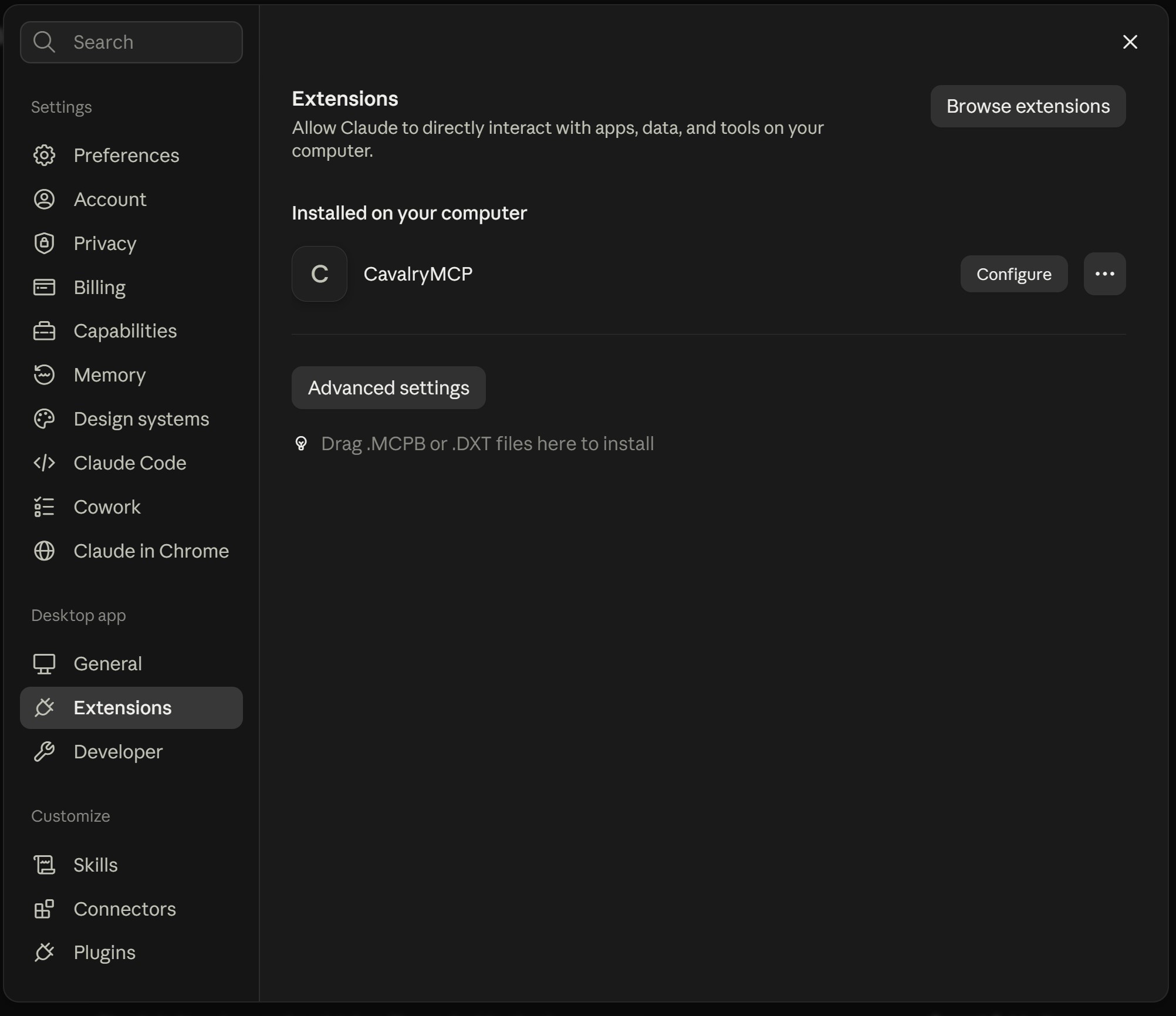
A download link is sent to you by email after checkout. It contains an .mcpb file (MCP Bundle). In Claude Desktop, open your preferences (by pressing Cmd/Ctrl + ,), go to the Extensions tab, and drag the downloaded .mcpb file in there to install CavalryMCP.
Usage
Start your prompt with "Use the CavalryMCP" (if you're in a new session). At the first time Claude tries to connect to your running Cavalry instance, it will install a small bridge UI script into Cavalry. This is done automatically. You only need to open Scripts > CavalryMCP in Cavalry and leave it open (Claude will you tell you this as well).
Releases
1.1.0 — 2026-10-06
- Knowledge base updated for Cavalry 2.8, including more type definitions, updated docs and example scripts.
- New MCP tools for the LLM to snapshot a single layer (instead of the whole frame) to syntax-check a script without running it and to search Cavalry's bundled example scenes.
- Various bug fixes and better validation of missing tool parameters.
- Please aks Claude to re-install the MCP bridge for you in Cavalry such that everything works smoothly.
1.0.0 — 2026-09-20
- Initial release
Comments are hosted by giscus and GitHub. Loading them sends your IP address and browser data there, and GitHub may set cookies.
Applies to this page only · Privacy